


KSHB 41 Kansas City News
4.1488.00 Reviews
App Specs
- Version
- Varies with Device
- Updated On
- License
- Free
- Downloads
- 100,000+
- Developer
- The E.W. Scripps Company
- Categories
- News & Magazines
- Platform
- Android
Screenshots



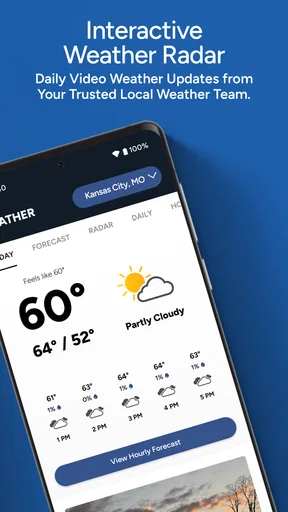
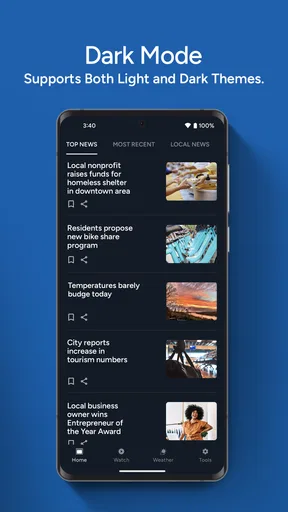
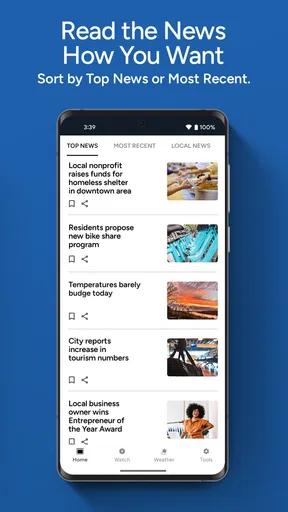


 Analysis by AppCompare
When I want a quick sense of what is happening around Kansas City, I do not always need a national news app with a long stream of unrelated headlines. I want local reporting and weather in one place, with enough detail to decide whether I should leave home now, change a weekend plan, or look into a developing story. That is the situation where KSHB 41 Kansas City News makes the most sense. It is a free news and magazine app from The E.W. Scripps Company, built around Kansas City news and weather rather than a broad national feed.
My overall impression is that it is most useful as a local starting point. It helps me move from “What is going on?” to “Does this affect me today?” without making me search through several unrelated sources first. The trade-off is that its value depends heavily on whether Kansas City is the place I care about. If I live elsewhere, travel widely, or want a much broader political and international briefing, a larger news service will probably be a better fit.
From a vague concern to a practical local update
The app’s role becomes clear in an ordinary morning scenario. I might wake up to heavy rain, hear about a road problem from a coworker, or notice that a local issue is appearing in conversations before I understand what actually happened. Opening this app gives me a focused route into the story: check the latest local headlines, look for weather information, then decide whether I need a deeper look or another source.
That sequence matters because local news is often about immediate consequences rather than background reading. A national app may tell me that severe weather is affecting a region, but a Kansas City-focused source is more relevant when I am deciding whether to delay a trip across town or change plans for an outdoor event. The app does not need to replace every other source to be useful. It needs to reduce the time between noticing a local problem and finding a relevant explanation.
I also like that the audience is straightforward. This is not presented as a specialist research tool or a social discussion platform. It is aimed at people who want local updates in a familiar mobile format. The Everyone content rating makes it suitable for a general household audience, including someone who simply wants a dependable way to follow the area without learning a complicated interface.
The app has been available since June 8, 2010, which gives it a long presence in the mobile news space. Its current reach is shown by more than 100 thousand installs, while its average rating sits at 4.1 from about 1.2 thousand ratings. Those figures suggest a solid, established audience, though I would not treat them as a guarantee that every reader will have the same experience. Local relevance, notification habits, and tolerance for advertising or changing coverage priorities can make a large difference.
The first pass: finding the story that matters
When I open the app, I approach it with a specific question rather than scrolling without a goal. Is there a major local development? Is the weather likely to affect my route? Is there a story I heard about that needs confirmation? This mindset makes the app more efficient because a focused local feed can still become noisy when every headline looks equally urgent.
Worth Reading Before You Choose

EA SPORTS FC Mobile 26 Is a Bigger Football Game, but It Takes Time

Flipboard Shows What News Apps Must Do Beyond the Feed

Switching to Android Auto Means Rethinking Your Driving Routine

Google Calendar Makes a Crowded Week Easier to Manage

Ludo King Makes the Most of the Minutes Between Plans

Baby Panda World Brings Quick Play to Modern Phones, but Its Game Library Feels Busy
I would start with the most recent local coverage, then separate immediate information from stories that are interesting but not relevant to my day. For example, a breaking incident may deserve attention now, while a feature or longer-running community story can wait until I have more time. That simple prioritization is one of the most useful habits with a local news app: the app supplies the stream, but I decide which item deserves action.
The weather side is especially practical when used before leaving home, not only during a storm. I can check conditions while deciding what to wear, whether to carry an umbrella, or whether a drive deserves extra time. The useful handoff here is from weather information to a real decision. If I only glance at a forecast and close the app, I have consumed information. If I use it to adjust my route or schedule, the app has done something more valuable.
One limitation is that a local app naturally reflects the priorities of its own newsroom and coverage area. It may not give me the same breadth as a national aggregator, and I should not expect it to function as a complete replacement for specialist sources on finance, science, sports, or international events. For Kansas City residents, that narrowness is often the point. For everyone else, it can feel like a restriction.
Moving from headline to context
A headline is only the input. Before I share it or make a decision, I want to open the full story and check what is actually known. This is where I find the app more useful than a short social-media post: the local setting gives the report a clearer connection to the people and places involved. I can pause, read the details, and decide whether the information is actionable or simply something to keep in mind.
I recommend treating the first report as a checkpoint rather than the final answer during a fast-moving event. Details can develop, and a local report may be updated as more information becomes available. If the issue affects safety, travel, school, work, or a financial decision, I would use the app to identify the situation and then verify critical instructions with the relevant official authority. That is not a criticism of this particular app; it is a sensible habit for any breaking-news service.
A useful workflow is to read the headline, open the story, identify the location and timing, and then ask what action is actually supported by the information. This prevents a common mistake: reacting to an alarming title without understanding whether the event is nearby or whether it is still developing. The app is strongest when I use it as a local filter, not as a reason to react instantly to every notification or dramatic phrase.
Another practical tip is to compare the weather information with my actual destination rather than relying on a general impression of conditions across the whole metropolitan area. Kansas City plans can involve a meaningful distance between home, work, school, and an appointment. A broad weather update may explain the overall situation, but my decision still depends on where I am going and when I need to arrive.
How the information travels into the rest of the day
The real value of a news app appears after I leave it. A local story may be handed from the app to a family group chat, a workplace conversation, a travel decision, or a longer discussion at home. I prefer to pass along the article after reading it rather than repeating a headline from memory. That small step keeps the handoff closer to the original reporting and reduces the chance that an incomplete detail becomes the main story.
Weather information follows a similar path. I might check it before commuting, tell someone else that plans need adjusting, and then look again later if conditions change. The app becomes one part of a chain: local report, personal interpretation, practical decision, and sometimes a second check. It is not just a place to consume headlines; it can serve as the first input into a small daily planning system.
For households, the app can also be a convenient common reference. Instead of each person relying on a different social feed, one person can point to a local report and explain why a plan is changing. That does not make the app an authority for every question, but it gives conversations a more concrete starting point than rumor or a cropped screenshot.
There is a trade-off in this handoff. Sharing local coverage is useful, but a story can lose its context when it moves into a message thread. I would include the article’s main point and avoid presenting an early report as a settled conclusion. If the app offers an updated version later, checking it again is worthwhile, especially for weather or developing incidents.
What I get at the end of the workflow
After using the app properly, the result is not necessarily a long reading session. Often it is a clearer decision: leave earlier, carry rain gear, postpone an outing, pay attention to a local issue, or simply stop wondering whether a rumor has any basis. That modest outcome is exactly where a focused local news app earns its place on my phone.
I would recommend it to Kansas City residents who want local headlines and weather together, people who have moved to the area and need a practical way to catch up, and anyone whose day is shaped by local conditions. It is also a sensible companion for someone who already reads national news but feels disconnected from what is happening nearby. The free price removes the main barrier to trying it, so the decision comes down more to relevance and personal reading habits than to cost.
The audience is less obvious for people who want a single app to cover everything. If my priority is international reporting, deep investigative archives, highly specialized business news, or a personalized cross-city feed, I would probably choose a broader news service. If I am outside the Kansas City area and only visit occasionally, a general weather and travel tool may be more useful than keeping a local newsroom app installed all the time.
Compared with social media, this app offers a more direct path from local event to reported story, without asking me to sort through posts from friends, commentators, and unrelated accounts. Compared with a national aggregator, it gives up breadth in exchange for regional focus. Compared with a weather-only app, it adds the surrounding news context that can explain why conditions matter. None of these options wins in every situation; the best choice depends on whether my first question is “What is happening nearby?” or something much wider.
Where the flow becomes less comfortable
The biggest point of friction is the same feature that makes the app useful: its focus. A concentrated local feed can feel repetitive if there is one dominant story, and it cannot satisfy someone opening the app for a broad daily briefing. I also need to manage my own attention. Local alerts can be valuable when they affect my route or safety, but too many interruptions would make the app feel demanding rather than helpful. I would keep notifications purposeful and use the app when I actually need an update.
Another limitation is the difference between information and certainty. A local report can tell me what is known at a particular moment, but it cannot remove the uncertainty of a developing event. I would be cautious about using one article as the sole basis for a serious decision, especially when official instructions, road conditions, or emergency guidance are involved. The app works best as an early and convenient source, followed by confirmation when the stakes are high.
There is also a personal trade-off between speed and depth. I can get a quick sense of the day, but readers who want extensive analysis may need to continue elsewhere. That is not a flaw if I use the app for awareness and another source for research. It becomes a problem only when I expect a local mobile news feed to perform the job of a newspaper archive, a specialist publication, and a live emergency channel at the same time.
Finally, the app’s usefulness depends on whether its coverage matches my location and interests within the Kansas City area. Someone living close to the center may care about different stories from someone farther out, and a person focused on neighborhood-level information may still need a more specialized community source. I would view this app as a strong regional layer, not as the only local reference I will ever need.
My recommendation after using it as a daily check-in
The best way to use KSHB 41 Kansas City News is as a local decision tool, not merely a headline reader. I would open it when I need to understand what is happening around Kansas City, connect the news with the weather, and decide whether anything should change in my schedule. I would then read beyond the title, share context rather than rumors, and verify high-stakes instructions through the appropriate official channel.
The app’s free access, general-audience rating, established availability, and local focus make it easy to recommend to Kansas City readers who want a straightforward starting point. Its 4.1 average from roughly 1.2 thousand ratings reflects a generally positive reception, while the more than 100 thousand installs show that it has found a meaningful audience. I would not choose it as my only news source, but I would keep it available for the moments when national coverage feels too distant and social feeds feel too uncertain.
In the end, I see it as a practical bridge between a local concern and a useful next step. It helps me notice the story, understand the immediate context, and make a better-informed choice about my day. If that is what I want from a Kansas City news app, it is a worthwhile free download from The E.W. Scripps Company. If I need a wider world view or highly specialized reporting, I would pair it with another service rather than asking it to do a job it was not designed to handle.
Pros
- Fast access to breaking news across the Kansas City area.
- Useful local weather forecasts
- alerts
- and radar updates.
- Live video coverage helps users follow major developing stories.
- Sports reporting includes updates relevant to local teams and fans.
- Simple layout makes headlines and sections easy to browse.
Cons
- Some stories may require a strong internet connection to load fully.
- Frequent notifications can feel excessive unless carefully customized.
- Content is primarily focused on the Kansas City viewing area.
- Video playback may use significant mobile data when streaming on cellular.
- Some features and coverage can vary depending on your location.
FAQs for KSHB 41 Kansas City News
What is the KSHB 41 Kansas City News app?
KSHB 41 Kansas City News is a local news application focused on the Kansas City area. It provides access to breaking news, weather updates, traffic information, sports coverage, investigative reports, and community stories. The app is designed for readers who want regional reporting in one place, with content that can be viewed on demand rather than only during scheduled television broadcasts.
What type of news and information can I find in the app?
The app typically covers major Kansas City headlines, local politics, crime and public safety, education, health, business, entertainment, and sports. It also includes weather forecasts, severe-weather alerts, radar information, and traffic-related updates. Coverage may include both Kansas and Missouri communities, so the app can be useful for residents, commuters, and anyone following events across the wider Kansas City metropolitan area.
Does the KSHB 41 app provide live streaming and breaking-news alerts?
Depending on your location, device, and current station availability, the app may offer live newscasts, special reports, or other streaming video from KSHB 41. Users can generally enable push notifications for breaking news, severe weather, and important local developments. Streaming and alerts require an internet connection, and some live content may be limited by broadcast rights, technical issues, or regional restrictions.
Is the KSHB 41 Kansas City News app free to download?
The app is generally available to download without an upfront purchase on supported Android and iOS devices. However, downloading the app does not necessarily mean that every feature is completely free of limitations. It may contain advertising, use mobile data for video and live streams, and require optional permissions for notifications or location-based weather information. Always review the store listing and privacy details before installing.
What permissions and privacy considerations should I know about?
Like many local news apps, KSHB 41 may request permission to send notifications, access approximate location for localized weather or content, and use network connectivity for articles, videos, and advertisements. You can usually deny optional permissions or change them later in your device settings, although doing so may reduce personalization. Before downloading, review the app-store privacy labels and the developer’s current privacy policy.


